
What is Information Technology
24/09/2014 13:01What is information technology?
It is the job of collecting data and representing as different types of information such as text, videos, sounds, images, etc.
What is a developer
What is information technology?
It is the job of collecting data and representing as different types of information such as text, videos, sounds, images, etc.
What is a developer
What is programming?
Is the process of writing programs with many code languages.
Who/What is Karel?
Karel is a dog that listens to your commands. Karel is also a programming language.
What is a command?
A command makes Karel do something in it's world.
What is a function?
Funtions allows to break down a program into smaller parts, and make the program easier to understand
What is the analogy we use to describe functions in Karel?
The analogy for functions in Karel is that we give Karel a brain
What is a bug?
A bug is mistake in your program and causes the program to crash.
What is top down design?
Top down design is breaking a big problem into a small problem and making the small problem into an even smaller problem.
How would you apply top down design to everyday activities?
Eating Lunch:
Why should you use comments?
It makes the code easy to read and easy to understand.
What is programming style?
It is that you have broken down the program in a reasonable way, and make the code easy to understand.
What can Super Karel do?
Super Karel can turn right and turn around.
What is a loop?
A loop allows you to repeat to repeat code.
What is a for loop?
A for loop allows you to repeat code for a fixed number of times.
When do we use a for loop?
We use for loops when you need to repeat something in a code for a certain amount of times.
What are examples of when you use if/else statements in your life?
If road is blocked: wait, else: cross.
What is a while loop?
A while loop allows you to repeat code while some condition is true.
How do we decide if we should use a while loop or a for loop?
You use a for loop if you want to repeat code for a fixed number of times, or you use a while loop when you want code to repeat infinite times while some condition is true.
What are different type of control structures, and how do know when to use each use?
Why is indenting important?
To show proper structure.
Here is my Karel Excercises Badge
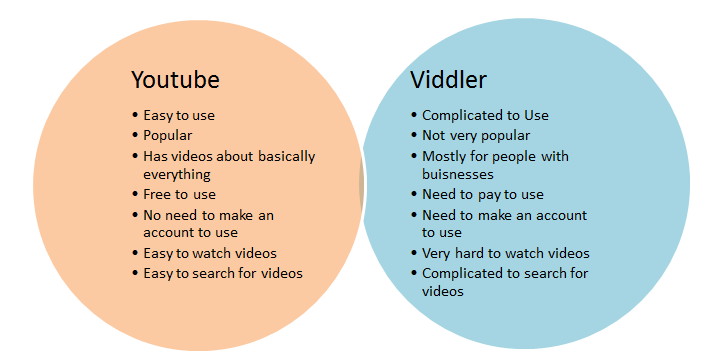
I have compared youtube and viddler using a venn diagram.
In Canada copyrights for music don’t state that websites that you use to go from YouTube to mp3 are not allowed but they do say that you can’t download music of sites like mp3skull.com. I think that YouTube to mp3 websites should be illegal because if people keep downloading music from YouTube soon enough artists will stop putting music on YouTube, and then people won’t be able to watch the music videos that the artists have put on YouTube. Some of the YouTube to mp3 websites have been taken down and are becoming harder to use so people don’t use them as much anymore but one day they will be taken down.
In this project we looked at several document sharing websites. We did the pros and cons of the websites and combined them together.
Meeting word is a good site for people to keep their work saved. The thing that impressed me the most was that on this site you can literally do anything from talking to your friends. The other thing I liked was it has a good connection. Most sites don’t have a good connection but this site is a master at this. Unfortunately every site has cons and the thing that disrupted me on this site was it is hard to understand but the rest about this site was good but overall it is a great site.
-T.K
Titan Pad is a good site for peeople work together with others over the web. The website is easy to work with and takes some features from microsft word which makes it easy to use. It does not require memberhip at all. But there were several problems with the connection the servers were slow I could not connect with other people. Which shows that the website is easy to work with but if you cant connect to other people it makes the website pointless.
-K.S.
Sync.in is the easiest way to connect to teammates and to keep each other on the same team. Sync in is a great site that has everything thing that business workers need. In this site if you missed work you can rewind back and redo your work. Another thing I liked was you can send your work to your friend on twitter and Facebook. You can chat with your friends anywhere in the world. The thing I don’t like about this site is that if you put your work on public access there is a better way than any other site to copy someone’s work. In conclusion this is a great site.
-T.K.
Primary pad is easy to use and its based on Microsoft Word. It is free to use but the connection was horrible, you can’t connect to your peers which gives a huge inconvenience so you can’t really use it with other people so there is no point of trying to use it.
-T.G.
Show Document is really easy to use and convenient for working with others on project and other group activities, there is many different things you can do on it such as using a whiteboard, File Share, Chat Translator, Google Maps, Chat Translator and many more, there is also fun things you can do on it like Tic Tac Toe and a game called Set. Sometimes it is a bit slow but most of the time it’s a really good website to use.
-T.G.
Pirate pad is a duplicate copy of meeting words and titan pad, it works the same with the microsoft base it has the same connection as it meeting words so it atleast connects unlike titan pad. The part about pirate pad is that it is the same old boring titan pad and meeting words which doesnt make it unique so that is why I dont like pirate pad or titan pad.
-K.S.
Make your own slideshow with music at Animoto.
Creative commons is a type of copyright that you use on your stuff so other people don’t claim it to be their own. If a file or work has a Creative commons license you have to do the following before using it:
· Check the kind of license the product has.
· Cite the product.
· If it is someone’s music you cannot alter it and etc.
If you don’t want to go through all that trouble you can use the “ creativecommons.org” search to use it on project. The search allows you to find images, music and other stuff that doesn’t have Creative Commons license on it.
I watched a video on infinite learning lab about online safety. In the video you learn about how a cat named Nermal gets a email from a stranger to meet up and trade comics, the person he meets up with is his enemy and he takes his collectors comic away but in the end he gets it back. The video teaches you how to be safe online they give you an example of being safe it is to not share your Y.A.P.P.Y which stands for Your Name, Addresses, Passwords, Phone Number, Your plans. The video shows that you should never share your yappy and be safe online.
Watch the video online at: https://learninglab.org/life_skills/online_safety/
Our new blog has been launched today. Stay focused on it and we will try to keep you informed. You can read new posts on this blog via the RSS feed.
|
|